



























.svg)
.svg)
.svg)
X (Twitter) Proxy Guide 2026:
API Tiers, Account Automation, and Staying Under the Limit
X's enforcement model has two completely separate layers. Rate limits on authenticated API traffic are account-level. Bot detection on browser traffic is IP-level. Almost every proxy guide for X treats them the same. They're not.
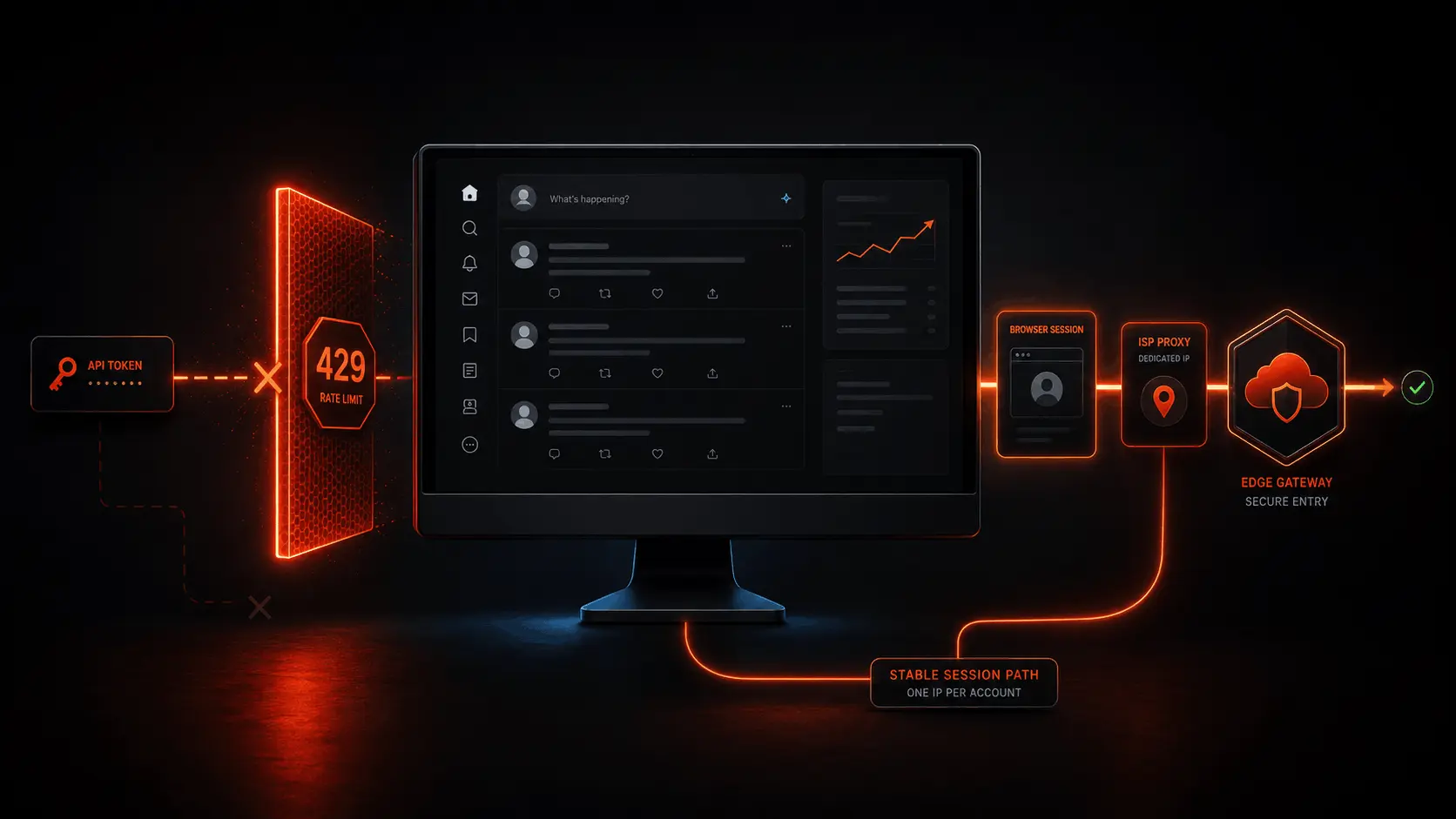
- API-based automation (OAuth / Bearer Token): Rate limits hit your token, not your IP. A 429 response won't clear by changing proxies. Rotating ISP or residential proxies reduce IP-level Cloudflare exposure but they don't fix token-level 429s. Manage windows with exponential backoff.
- Browser-based automation (Playwright, Puppeteer, Selenium): IP is the primary enforcement layer here. Cloudflare blocks datacenter ASNs outright. ISP static proxies from consumer ISP ASNs pass Cloudflare's reputation check. One IP per account, never rotated, for logged-in session management.
- Datacenter proxies fail at the Cloudflare layer before any X-side check runs. This applies to both API and browser traffic. Cloud provider ASNs are effectively blocked.
- X posts: 100 per 15 minutes per user token, 10,000 per 24 hours per app. These are the official rate limits on POST /2/tweets as of 2026. Read limits vary by endpoint.
- March 2026 saw a mass ban wave targeting inauthentic behavior. Accounts using unauthorized automation tools were hit in bulk. Account-level trust scoring is now a more active enforcement factor than it was in 2024.
Why Most X Proxy Content in 2026 Is Outdated
Search for "Twitter proxy automation" right now and most of the results were written between 2021 and 2023. That content describes an X API with three subscription tiers, a free tier with 500,000 monthly reads, and a Basic tier at $100 per month. It offers advice about managing rate limits by spreading requests across multiple API keys on the free plan. None of that structure exists for new developer accounts anymore.
X migrated to pay-per-use pricing. New developers sign up through the developer console, purchase credits, and get charged per resource fetched. $0.005 per post read, $0.015 per post create. Rate limits still exist, but they're now decoupled from a subscription tier. You can be within your rate limit window and still incur meaningful costs. You can also hit a 429 rate limit without any billing event at all. The two systems are independent.
The second thing most proxy guides get wrong is treating X as a single enforcement system. It's two systems operating in parallel. Authenticated API traffic goes through X's API infrastructure with token-based rate limits. Browser-based access to x.com goes through Cloudflare, which evaluates IP reputation and browser fingerprints before any request reaches X's application layer. These systems have different failure modes, different proxy requirements, and different recovery paths.
The 2023+ API Restructuring: What Actually Changed
X's API went through two major changes after the 2022 ownership transition. The first was the elimination of the free tier for API access in early 2023. The second was the migration to pay-per-use pricing, which moved the platform away from fixed monthly subscription tiers entirely.
The shift to pay-per-use has a few practical consequences for how you think about proxy strategy. Rate limits still exist as hard frequency caps, and they're independent of billing. You can exhaust your credit balance without hitting a rate limit. You can hit a rate limit 429 without triggering a billing event. These are separate controls with separate recovery paths.
What Exists Now vs What Old Guides Describe
| Feature | Old Structure (pre-2023) | Current Structure (2026) |
|---|---|---|
| Free tier | 500K reads/month, limited writes | Not available for new signups |
| Basic tier | $100/month, 3,000 writes/month | Not available for new signups |
| Pro tier | $5,000/month, 1M reads/month | Not available for new signups |
| Current model | N/A | Pay-per-use credits. No commitments. |
| Post read cost | Included in monthly tier | $0.005 per resource |
| Post write cost | Monthly cap, then blocked | $0.015 per request (or $0.20 with URL) |
| Rate limits | Tied to subscription tier | Per-endpoint, per-15-min window, independent of billing |
| Enterprise | Separate contract | Separate contract with custom limits |
Two Threat Models. Two Proxy Setups.
This is the section most proxy guides skip. The reason X proxy advice is so inconsistent is that people conflate two completely different automation approaches, each with its own enforcement model and proxy requirements.
Threat Model 1: Authenticated API Traffic
This is automation using X's official API with a developer account, Bearer Token for app-only requests, or OAuth user tokens for user-context operations. When you authenticate with X's API, your rate limits are tracked against your token, not your IP address. The 429 response codes come from X's API infrastructure, which checks your token's request count against the per-endpoint window.
Changing your IP address does not reset these counters. Rotating from one proxy to another does not help. The rate limit is attached to the Bearer Token or the OAuth user context, and it resets on a 15-minute or 24-hour schedule regardless of what IP made the requests.
Where proxies do matter in this model: Cloudflare still inspects the incoming IP before the request reaches X's API layer. A datacenter IP can get Cloudflare-blocked before the API even sees it. So you still need non-datacenter IPs for API requests. But the primary operational constraint is token management, not proxy rotation.
Threat Model 2: Browser-Based / Unauthenticated Traffic
This covers two separate approaches: browser automation with a logged-in X account (Playwright, Puppeteer running x.com with a real session), and unauthenticated scraping of public X pages without any developer account.
Both hit Cloudflare before they hit anything else. Cloudflare evaluates the connecting IP's ASN and reputation score. Datacenter IPs from cloud provider ASNs are blocked at this layer outright. Consumer ISP IPs from AT&T, Virgin Media, Deutsche Telekom, and similar carriers pass the ASN check.
For logged-in browser automation specifically, X also enforces session coherence. The IP associated with an authenticated session needs to stay consistent. A different IP appearing mid-session on the same account triggers a security check or forced re-authentication. ISP static proxies handle this by providing a fixed IP that never rotates.
Bearer / OAuth Token
ASN check (IP-level)
Token rate limits (account-level)
200 or 429
Playwright / Puppeteer
ASN + fingerprint (IP-level)
Session coherence check
Page or challenge
code: 88, message: "Rate limit exceeded" from the X API, no proxy change will fix it. Check the x-rate-limit-reset header and wait for the window to reset. If your browser automation is returning a Cloudflare challenge page or CAPTCHA, the problem is your proxy's ASN or IP reputation. Those are different problems with different solutions.
How X Detects Bots in 2026
X's detection runs across multiple layers, and as with any Cloudflare-protected platform, the layers execute in sequence. Getting blocked at an early layer means later layers never run. This changes which problem you're actually solving.
Layer 1: Cloudflare ASN Classification
The first check is the originating IP's ASN. Cloud provider and datacenter ASNs (AWS, Google Cloud, Azure, DigitalOcean, OVH, and similar) are identified immediately and either blocked or heavily scrutinized. Consumer ISP ASNs from carriers like AT&T (AS7018), Comcast (AS7922), Windstream (AS7029), Virgin Media (AS5089), British Telecom (AS2856), and Deutsche Telekom (AS3320) carry significantly lower fraud scores and pass the initial ASN check.
Layer 2: IP Reputation Score
Beyond ASN classification, Cloudflare maintains IP-level reputation scores based on historical traffic patterns. An ISP IP that has been used for prior abuse carries a higher fraud score even if it's from a consumer ISP ASN. Clean ISP static IPs from pools specifically tested against social platforms (like TorchProxies' Social pool) carry low Cloudflare fraud scores because they haven't been burned through by prior automation traffic.
Layer 3: Browser Fingerprint (Browser-Based Only)
For browser-based automation, Cloudflare evaluates the TLS fingerprint of the connecting client. Python's requests library produces a JA3 hash that Cloudflare's bot signature database identifies as a non-browser client. Playwright and Puppeteer, running actual Chromium instances, produce browser-matching TLS fingerprints that pass this check more reliably. Standard requests or httpx calls against x.com will be challenged at this layer.
Layer 4: Session Coherence (Authenticated Sessions)
X tracks the IP associated with each authenticated session. A session that starts on one IP and then appears from a different IP is treated as a potential account takeover. The response is usually a security challenge, forced logout, or temporary account restriction. This is why ISP static proxies are the correct choice for logged-in account management: the IP never changes, so the session never triggers a coherence alert.
Layer 5: Behavioral Analysis and Account Trust Scoring
X's backend scoring system evaluates request timing patterns, action sequences, and account-level trust indicators. In March 2026, X ran a major enforcement wave targeting inauthentic behavior, suspending thousands of accounts exhibiting coordinated posting patterns, automated follow-unfollow behavior, and mass liking. These are account-level actions that proxies have no influence over. The trust scoring system looks at account age, verification status, follower count, and posting history. New accounts with no history hit behavioral restrictions faster than aged accounts with genuine activity.
X API Rate Limits: The Endpoints That Matter
These are the official rate limits from X's documentation as of June 2026. Two things to note before reading this table: per-user limits apply when you authenticate with an OAuth user token, per-app limits apply when you use a Bearer Token for app-only requests. They are separate counters on the same endpoint.
| Endpoint | Method | Per User (OAuth) | Per App (Bearer) | Window |
|---|---|---|---|---|
| POST /2/tweets (Create post) | Write | 100 requests | 10,000 requests | 15 min / 24 hrs |
| GET /2/tweets/:id (Lookup) | Read | 900 requests | 450 requests | 15 min |
| GET /2/tweets/search/recent | Read | 300 requests | 450 requests | 15 min |
| GET /2/tweets/search/all (Full archive) | Read | 1/sec | 300 requests, 1/sec | 15 min |
| GET /2/users/:id/tweets (Timeline) | Read | 900 requests | 10,000 requests | 15 min |
| GET /2/users/:id/followers | Read | 300 requests | 300 requests | 15 min |
| POST /2/users/:id/likes | Write | 50 requests | N/A (user only) | 15 min (1,000/24hr) |
| POST /2/users/:id/following | Write | 50 requests | N/A (user only) | 15 min |
| GET /2/tweets/search/stream | Stream | N/A | 50 connections | 15 min |
| DELETE /2/tweets/:id | Write | 50 requests | N/A | 15 min |
The rate limit that catches most people is the write limit on POST /2/tweets: 100 per 15 minutes per user. That's roughly 6.67 posts per minute, or one every nine seconds if you're running at capacity. For most publishing workflows this is fine. For bulk posting operations it's the binding constraint, and no proxy change loosens it.
Reading Rate Limit Headers
Every X API response includes rate limit headers. Check these before you hit 429, not after.
import requests, time

def post_tweet_with_limit_tracking(text, headers, proxy):
    r = requests.post(
        "https://api.x.com/2/tweets",
        json={"text": text},
        headers=headers,
        proxies={"https": proxy},
        timeout=15
    )

    # Always read these headers, not just on 429
    remaining = int(r.headers.get("x-rate-limit-remaining", 1))
    reset_ts  = int(r.headers.get("x-rate-limit-reset", 0))

    if r.status_code == 429:
        wait = max(reset_ts - time.time(), 60)
        print(f"Rate limited. Waiting {wait:.0f}s until reset.")
        time.sleep(wait)
        return post_tweet_with_limit_tracking(text, headers, proxy)

    # Proactive throttle: pause when fewer than 10 requests remain
    if remaining < 10:
        wait = max(reset_ts - time.time(), 5)
        print(f"Low on requests ({remaining} left). Pausing {wait:.0f}s.")
        time.sleep(wait)

    return r

# Note: changing 'proxy' here does NOT reset the rate limit counter.
# The 429 tracks the Bearer Token or OAuth token, not the IP.
Proxy Type Comparison for X Automation
| Proxy Type | Cloudflare ASN Check | Session Coherence | API Traffic | Browser-Based Account Mgmt | Public Scraping |
|---|---|---|---|---|---|
| ISP Static | Consumer ISP (passes) | Fixed IP, never rotates | Pass | Best choice | Works, overkill for volume |
| Rotating Residential | Home ISP (passes) | Fails (rotates per request) | Works for unauthenticated | Fails for logged-in sessions | Best for unauthenticated scraping |
| Sticky Residential | Home ISP (passes) | Holds until window expires | Works within sticky window | Risky (expiry = IP change) | Pass |
| Mobile (4G/5G) | Carrier ASN (highest trust) | CGNAT, passes checks | Pass | Pass (premium cost) | Pass |
| Datacenter | Cloud ASN (blocked by Cloudflare) | N/A | Blocked at Cloudflare before API | Blocked | Blocked |
ISP Social Pool for X
TorchProxies ISP Social pool provides dedicated static IPs from major consumer ISPs, pre-tested specifically for social platform account management. For X operations, the relevant pools are US Social (AT&T, Comcast, Windstream, RCN, Wave, Spectrum/Charter, Frontier), UK Social (Virgin Media, British Telecom), and Germany Social (Deutsche Telekom). These ASNs carry low Cloudflare fraud scores and pass X's IP reputation checks.
The Social pool differs from general-purpose ISP pools in one practical way: the IPs have been validated against social platform detection systems before being assigned. A fresh ISP IP that has never been used for automation traffic carries a better reputation baseline than a recycled IP that has run through 20 prior tenants' automation setups. That distinction matters more on X in 2026 than it did two years ago, given how aggressively the platform has tightened its enforcement.
Pricing for the ISP Social pool starts at $2.40/IP for 5 IPs and scales to $2.30/IP at 25 or more IPs. Bulk options go to 200 IPs at $460. All IPs include unlimited bandwidth, instant delivery, and support for both SOCKS5 and HTTPS with username/password or IP whitelist authentication.
Step-by-Step Setup: API vs Browser Automation
Setup A: API-Based Automation (Official X API)
import requests

proxy = "http://USER:PASS@HOST:PORT"
r = requests.get(
    "https://ipinfo.io/json",
    proxies={"http": proxy, "https": proxy},
    timeout=10
)
data = r.json()
print(f"IP:  {data['ip']}")
print(f"Org: {data['org']}")  # Must be consumer ISP, not cloud provider
print(f"Loc: {data['city']}, {data['country']}")

# Good: AS7018 AT&T Internet Services
# Good: AS3320 Deutsche Telekom AG
# Good: AS5089 Virgin Media Limited
# Bad:  AS16509 Amazon.com (blocked by Cloudflare)
# Bad: AS15169 Google LLC (blocked by Cloudflare)tweepy), set it in the underlying session. For direct requests calls, pass the proxies parameter. The proxy only helps with the Cloudflare layer. Token-level rate limits are unaffected.import requests, time
BEARER = "YOUR_BEARER_TOKEN_HERE"
PROXY = "http://USER:PASS@HOST:PORT"
headers = {
"Authorization": f"Bearer {BEARER}",
"Content-Type": "application/json"
}
proxies = {"https": PROXY}
def search_recent(query, max_results=10):
url = "https://api.x.com/2/tweets/search/recent"
params = {"query": query, "max_results": max_results}
r = requests.get(url, headers=headers, params=params,
proxies=proxies, timeout=20)
if r.status_code == 429:
reset = int(r.headers.get("x-rate-limit-reset", time.time() + 900))
wait = max(reset - time.time(), 60)
print(f"429: waiting {wait:.0f}s for window reset")
time.sleep(wait)
return search_recent(query, max_results)
r.raise_for_status()
return r.json()
# The proxy routes traffic past Cloudflare's ASN check.
# Rate limit 429s are token-based. Switching proxies won't help them.Setup B: Browser-Based Account Management (Playwright)
from playwright.sync_api import sync_playwright
import time, random

PROXY_CONFIG = {
    "server":   "http://HOST:PORT",
    "username": "USER",
    "password": "PASS"
}

# One ISP static IP per account. Persistent context keeps cookies.
with sync_playwright() as p:
    browser = p.chromium.launch(headless=True)
    context = browser.new_context(
        proxy=PROXY_CONFIG,
        storage_state="account_cookies.json",  # persist session
        viewport={"width": 1280, "height": 800},
        user_agent="Mozilla/5.0 (Windows NT 10.0; Win64; x64) AppleWebKit/537.36 (KHTML, like Gecko) Chrome/131.0.0.0 Safari/537.36"
    )
    page = context.new_page()

    # Natural timing between actions (3-8 second variance)
    page.goto("https://x.com/home")
    time.sleep(random.uniform(3.0, 8.0))

    # Save updated session state after actions
    context.storage_state(path="account_cookies.json")
browser.close()X Account Safety: What Proxies Can and Cannot Do
Proxies handle the IP layer. They can't fix everything. Here's what they actually control versus what they don't.
| Problem | Proxy Fixes It? | What Actually Fixes It |
|---|---|---|
| Cloudflare blocking API or browser traffic | Yes | Switch to a consumer ISP ASN proxy (AT&T, Virgin Media, DTAG) |
| Session coherence challenge (IP changed mid-session) | Yes | ISP static proxy, one per account, never rotated |
| API rate limit 429 (token-level) | No | Exponential backoff, check x-rate-limit-reset header, wait for window |
| Account suspended for automated engagement | No | Stop automated liking/following/retweeting; account warming before automation |
| Account flagged for spam posting | No | Reduce posting volume; introduce content variation; build account trust score |
| Credit balance exhausted | No | Add credits in Developer Console; optimize queries to reduce resource fetches |
| Multiple accounts sharing one IP flagged | Yes | One ISP static IP per account; never share IPs across accounts |
TorchProxies: Which Product for Which X Use Case
| Use Case | Product | Price | Why |
|---|---|---|---|
| X account management and browser-based automation | ISP Social Pool (US / UK / DE) | From $2.30/IP (25+ IPs) | Fixed consumer ISP IP. Passes Cloudflare ASN check. Satisfies X session coherence. One IP per account, never rotated. AT&T, Comcast, Virgin Media, BT, DTAG carriers. |
| X API automation (authenticated reads and writes) | ISP Social Pool or Premium Residential | $2.30/IP or $4.5/GB | Non-datacenter ASN bypasses Cloudflare. Token-level 429s are unaffected by proxy type. ISP static for consistent sessions; residential for volume read pipelines. |
| Unauthenticated public scraping of x.com | Premium Residential | $4.5/GB | Rotating IPs for unauthenticated requests. No session coherence requirement. Cost-effective at volume. Consumer home ISP ASN passes Cloudflare's check. |
| Mixed pipelines (account management + data collection) | Plan X Hybrid | $5/GB | 120M+ IP pool combining ISP, mobile, and residential. Single endpoint for workflows that need both session-stable account traffic and rotating scraping volume. |
Summary
Frequently Asked Questions
requests).
x-rate-limit-remaining (requests left in the current window) and x-rate-limit-reset (Unix timestamp when the window resets). Your requests are blocked until that reset time, after which the limit refreshes automatically. Changing proxies does not help because the rate limit is tracked against your Bearer Token or OAuth user token, not your IP. The correct approach is exponential backoff: read the x-rate-limit-reset timestamp and wait until that time before retrying.