



























.svg)
.svg)
.svg)
How Platforms Detect Bots: The 5 Layers of Modern Bot Detection
Network reputation catches the easy cases. Everything that gets through runs into fingerprinting, behavior, and a machine learning model that scores all four together.
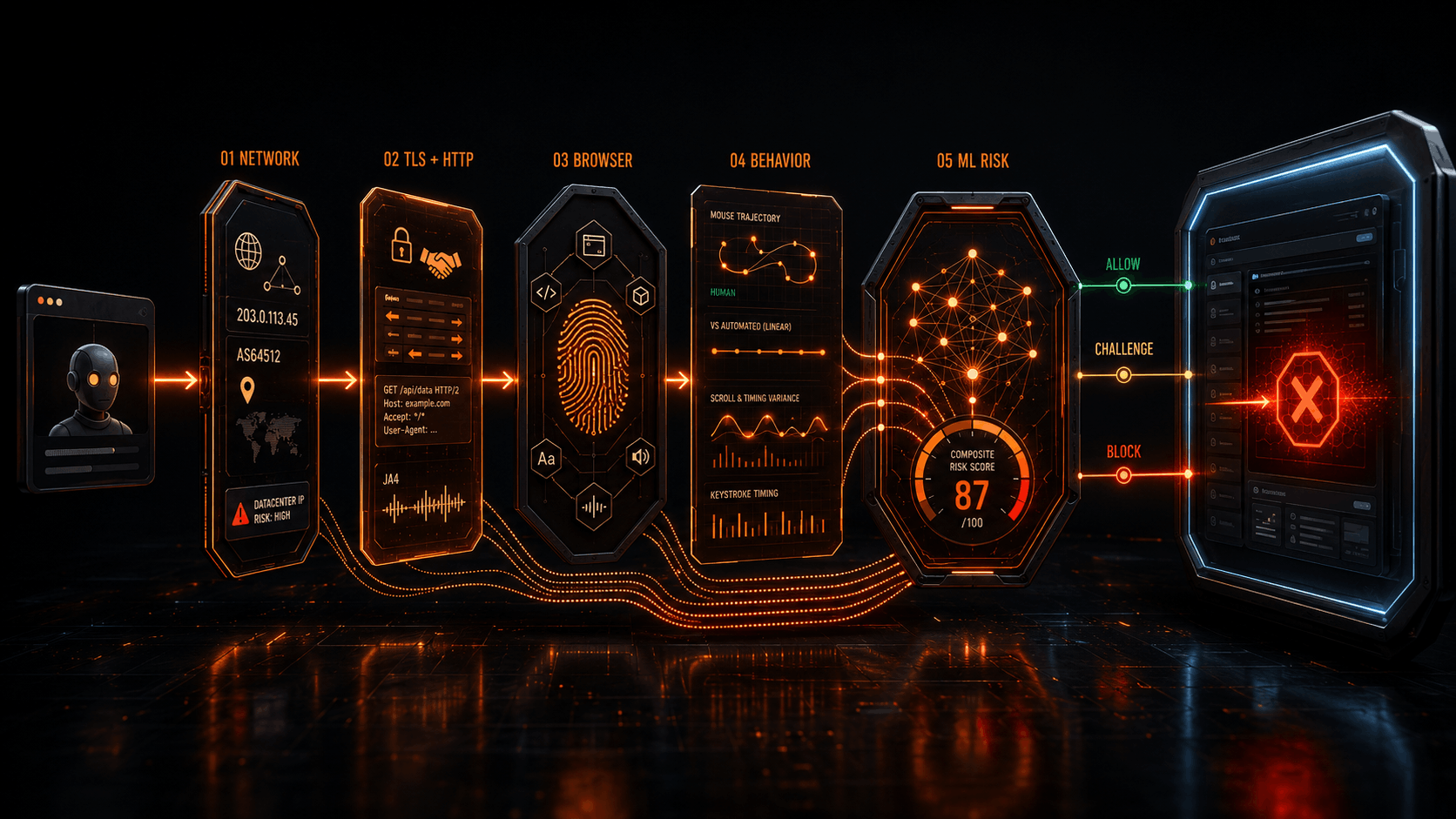
Bot detection isn't one check. It's five, run in sequence, each catching what the last one missed.
- Automated traffic hit 53% of all web traffic in 2025, with bad bots alone accounting for 40%, based on an analysis of 17.2 trillion requests (Imperva 2026 Bad Bot Report).
- Detection coverage is inconsistent industry-wide. Only 2.8% of 16,900+ audited websites blocked every tested bot vector in 2025, down from 8.4% in 2024 (DataDome).
- Five layers run as a pipeline: network reputation, TLS/HTTP fingerprinting, browser/device fingerprinting, behavioral analysis, then CAPTCHAs and a composite ML risk score.
- CAPTCHA effectiveness depends entirely on the solver. Specialized ML solvers approach 99% accuracy; general-purpose AI agents solve 28-60% depending on the model.
- No single signal decides a block. Fixing one flagged layer, like rotating to a cleaner IP, rarely resolves detection if the TLS fingerprint or behavior still doesn't match.
Bots now outnumber the traffic share bad actors had a year ago. Automated requests reached 53% of all web traffic in 2025, and bad bots specifically made up 40% of it, up from 37% the year before, according to an analysis of 17.2 trillion requests (Imperva's 2026 Bad Bot Report). Platforms didn't respond with one filter. They built a stack.
Modern bot detection runs as five layers, each catching what the layer before it missed. A request that clears network checks still has to survive fingerprinting. A request with a clean fingerprint still has to move like a human. Understanding this stack matters whether you're defending a platform against abuse or running legitimate automation that keeps getting flagged as a false positive.
Layer 1: Network Reputation
The first check happens before a single byte of the page loads. Platforms inspect the IP address, its autonomous system number (ASN), and its request pattern against known-bad lists.
Platforms also cross-reference IP geolocation against account history, account for known VPN and Tor exit nodes, and apply rate limiting to flag IPs making requests faster than a human plausibly could.
The volume this layer alone has to process is enormous and growing fast. HUMAN Security analyzed more than one quadrillion digital interactions in 2025 and found automated traffic grew 23.51% year-over-year, compared to 3.10% growth in human traffic, with agentic AI traffic specifically growing 7,851% year-over-year (HUMAN Security 2026 State of AI Traffic & Cyberthreat Benchmark Report). Network-layer filtering is the cheapest place to catch that volume, so it's tuned to be aggressive.
Imperva's 2026 report also found AI-driven attack volume rose sharply: the daily average of blocked AI-attributed incidents climbed from roughly 2 million to 25 million over the course of 2025, a 12.5x increase.
Layer 2: TLS and HTTP Fingerprinting
A request can pass IP reputation checks and still get flagged here, because this layer looks at how the connection itself was built, not where it came from.
requests, Node's axios, and curl produce distinctly different ones, because their underlying TLS stacks negotiate handshakes differently than a real browser engine does.A mismatched JA4 fingerprint is one of the fastest ways to get flagged as automated, independent of IP or headers. HTTP/2 fingerprinting works the same way at the application layer, sometimes called Akamai-style fingerprinting: it examines the order of pseudo-headers, stream priority settings, and frame sequencing during connection setup. Header casing and ordering matter too. Real browsers send headers in a consistent, engine-specific order, while many HTTP client libraries send them alphabetically or in whatever order the code happens to construct them.
| Year | Sites Fully Protected Against Every Tested Bot Vector | Trend |
|---|---|---|
| 2024 | 8.4% of 16,900+ audited sites | Baseline |
| 2025 | 2.8% of 16,900+ audited sites | Down 67% YoY |
That gap is bigger than most defenders would like. DataDome's audit of more than 16,900 websites found only 2.8% fully blocked every tested bot threat vector in 2025, down from 8.4% the year before, and more than 61% of domains failed to detect any of the test bots at all (DataDome 2025 Global Bot Security Report). TLS and HTTP fingerprinting is one of the more consistently under-implemented layers, largely because it requires low-level control over the TLS stack that most web application frameworks don't expose by default.
Layer 3: Browser and Device Fingerprinting
Once a connection is established and headers look clean, platforms turn to the execution environment itself: is this a real browser, or something pretending to be one?
Canvas fingerprinting renders a hidden graphic and reads back the pixel output, which varies slightly based on GPU, driver, and font rendering, enough to build a near-unique identifier across sessions. WebGL fingerprinting does the same with 3D rendering calls, exposing GPU vendor and renderer strings. AudioContext fingerprinting measures subtle variations in how a device processes an audio signal. None of these individually is conclusive, but combined with font enumeration and screen/viewport metadata, they form a fingerprint that's very hard to fake convincingly across every property at once.
Headless browsers get caught by more direct signals too. The navigator.webdriver property is true by default in Selenium and Playwright unless explicitly suppressed. Headless Chrome has historically reported a different navigator.plugins list and User-Agent string than headful Chrome. Missing mouse/touch event support, unusual window.outerWidth/innerWidth ratios, and the absence of expected browser APIs all feed into this layer's score.
Layer 4: Behavioral Analysis
A request can have a clean IP, a valid TLS fingerprint, and a convincing browser fingerprint, and still get flagged here, because this layer isn't looking at what the client claims to be. It's watching what it actually does.
Mouse and Keystroke Signals
Human cursor paths curve, accelerate, and overshoot targets slightly before correcting. Scripted mouse movement, even when randomized, tends to follow either perfectly straight lines or statistically smoother curves than real human motor control produces. Keystroke dynamics measure the timing between keypresses and dwell time on each key, which varies by individual but falls within a human-plausible range that's difficult to fake convincingly at scale.
Timing Is the Simplest Tell
A human can't fill out a checkout form in 400 milliseconds. A bot completing a multi-step flow with suspiciously consistent inter-action timing, say exactly 1.2 seconds between every click, reads as scripted even if every individual signal upstream looked clean, because real human timing has natural variance that scripts often fail to replicate.
Account takeover attempts get caught at this layer too. HUMAN Security's benchmark found organizations averaged more than 400,000 post-login account-takeover attempts in 2025, over 4x the 2024 rate, with account takeover making up more than 13% of login traffic in EMEA versus under 3.5% globally (HUMAN Security 2026 report). Credential-stuffing bots run through residential proxy pools with real browser engines, so they pass network and fingerprinting checks easily. Behavioral analysis at the login form is the layer that actually catches them.
Layer 5: Challenges and ML Risk Scoring
The final layer is where everything from the first four layers gets combined into a single decision, and where platforms deploy active challenges when the risk score sits in ambiguous territory.
CAPTCHAs remain the most visible challenge type, but their effectiveness against different classes of automation varies enormously. Purpose-built ML solvers, YOLOv8-based object detection pipelines in academic research from ETH Zurich, for instance, crack reCAPTCHA v2 with near-100% accuracy, actually exceeding the roughly 68-71% solve rate of average human users (ETH Zurich research, via UNU Campus Computing Centre). General-purpose AI agents tell a different story.
| Solver Type | reCAPTCHA v2 Solve Rate | Verdict |
|---|---|---|
| Specialized ML solver (YOLOv8-based) | ~99% | Breaks CAPTCHA |
| Average human | 68-71% | Baseline |
| Claude Sonnet 4.5 (general-purpose) | 60% | Inconsistent |
| Gemini 2.5 Pro (general-purpose) | 56% | Inconsistent |
| GPT-5 (general-purpose) | 28% | Inconsistent |
A 2025-2026 benchmark testing frontier models directly against reCAPTCHA v2 found Claude Sonnet 4.5 solved it 60% of the time, Gemini 2.5 Pro 56%, and GPT-5 just 28%, with cross-tile image challenges dropping success to 0-2% for all three (POH Research CAPTCHA Benchmarking). The takeaway: CAPTCHAs aren't dead, but they're only strong against generalist agents, not specialized bypass tooling. That distinction matters more than most "CAPTCHAs are dead" headlines let on.
Beyond CAPTCHAs: the Composite Score
Proof-of-work challenges also run at this layer: silent computational puzzles that cost bots CPU time at scale but are invisible to a single human user. Every upstream signal, IP reputation, TLS fingerprint, browser fingerprint, behavioral score, feeds into a machine learning model that outputs one composite risk score. This is the core product of vendors like Cloudflare Turnstile, DataDome, HUMAN (formerly PerimeterX), Akamai Bot Manager, and Kasada: not any single detection technique, but the model that weighs all of them together and decides whether to allow, challenge, or block.
The stakes for getting this layer wrong are high on both sides of the ledger. Imperva and Marsh McLennan's analysis of more than 161,000 cyber incidents found automated bot attacks cost businesses up to $116 billion a year, with insecure APIs adding roughly $87 billion more. Those categories overlap significantly, since a large share of API attacks are themselves bot-driven, which is why the report's blended combined-risk estimate lands near $186 billion rather than a straight sum of the two (Imperva/Marsh McLennan, "Economic Impact of API and Bot Attacks"). Bots account for roughly 30% of API attacks specifically.
How the Five Layers Work Together
None of these layers operates in isolation, and that's the point. A platform doesn't ask "is this IP bad?" and stop there. It asks how the network signal, the fingerprint, the browser environment, and the behavior pattern combine into one probability.
A residential IP with a perfect TLS fingerprint but robotic mouse movement still gets flagged. A slightly unusual fingerprint from a real user on an old browser version, paired with normal behavior and a clean IP history, usually gets through without a challenge.
Fixing a single flagged signal rarely resolves a detection problem on its own, for the same reason. Rotating to a cleaner IP doesn't help if the TLS fingerprint still doesn't match a real browser. Patching navigator.webdriver doesn't help if mouse movement is still linear. Getting every layer right simultaneously is exactly why infrastructure choices like proxy type, browser engine, and request pacing all matter together rather than individually.
The 5 Layers at a Glance
navigator.webdriver. Anti-detect browsers evade roughly 93% of tested sites, per DataDome's 2025 audit.
Frequently Asked Questions
navigator.webdriver, plugin lists, permission query behavior, and rendering quirks that fingerprinting scripts check directly, independent of what the User-Agent claims.