



























.svg)
.svg)
.svg)
YouTube Channel Management Proxies in 2026:
Google's Cross-Service Tracking and Multi-Account Safety
Most "YouTube proxy" content is about view botting. That's a different problem, a different risk, and a different type of person reading it. This is about the legitimate use case: agencies, brands, and creators managing multiple channels safely.
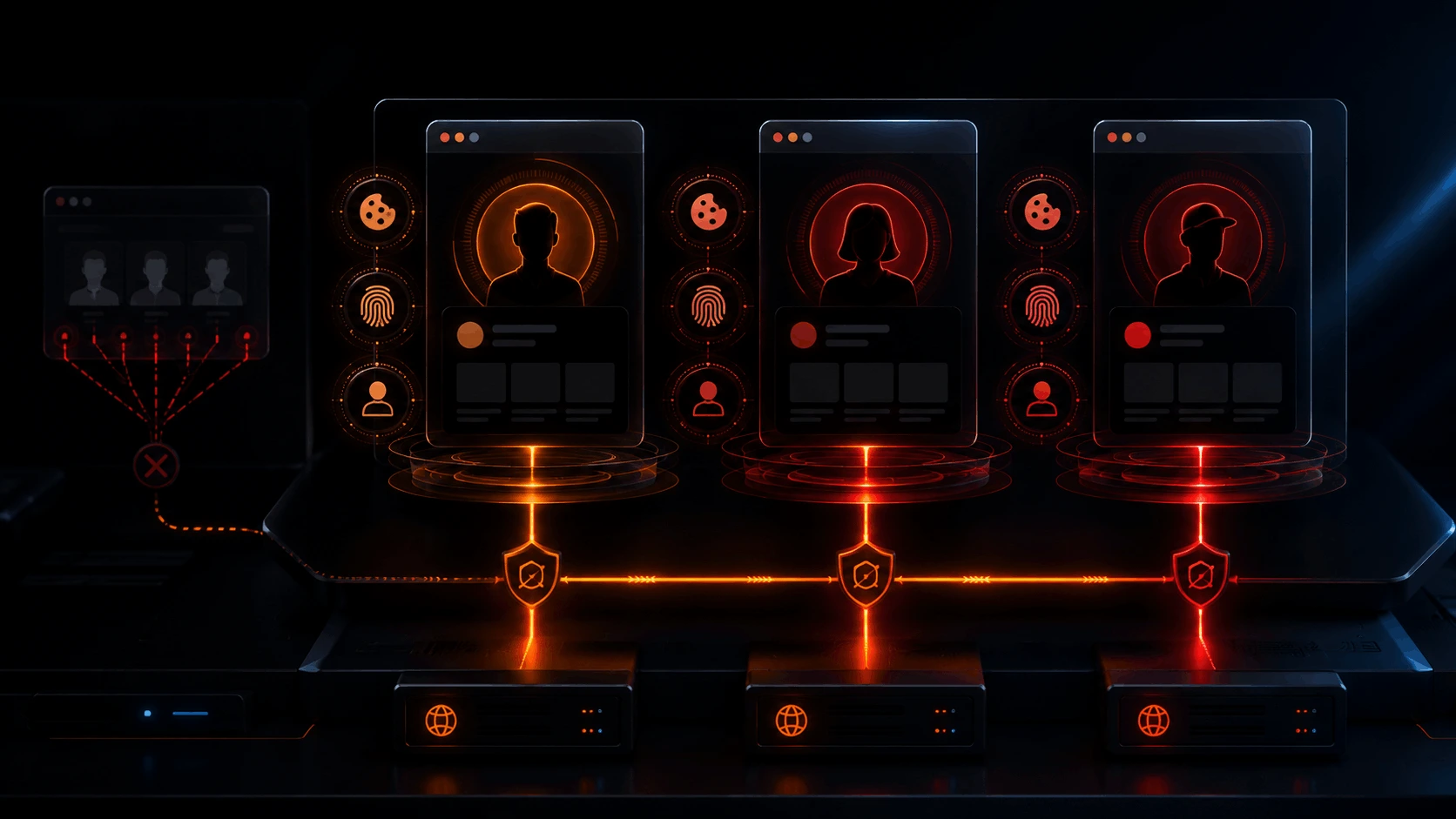
- Proxy alone is not sufficient. If Chrome is signed into Gmail, Google ties every tab in that browser to your identity regardless of IP. You need a separate browser profile per channel, not just a separate IP.
- Google tracks five linkage signals simultaneously: IP address, browser fingerprint, signed-in Google account, cookies and local storage, and shared payment methods. Any two of these shared across channels creates association risk.
- ISP static proxies are the correct proxy type. Datacenter IPs are flagged by Google's detection infrastructure. Static ISP IPs from consumer carriers (AT&T, Virgin Media, Deutsche Telekom) present as regular household connections. One IP per channel, never rotated.
- Cascading channel termination is real. If one channel in an associated cluster violates YouTube's policies, Google can terminate all channels sharing the same linkage signals. An agency that accidentally links a client's channel to its own Google account is one strike away from losing both.
- The Social pool covers US, UK, and Germany. For other markets: residential proxies from TorchProxies' hybrid pool are the fallback for channel management outside those three countries.
What "YouTube Proxy" Searches Return vs What Agencies Actually Need
Search for "YouTube proxy" and you get two categories of results. The first is web proxies for unblocking YouTube in countries with content restrictions or on school/corporate networks. The second is guides on using proxies to buy or inflate views, which violates YouTube's Terms of Service and eventually gets your channel penalized or terminated.
Neither is what an agency, brand team, or multi-format creator is looking for. The legitimate use case is simpler: you manage multiple YouTube channels for different clients or different content verticals, and you need to make sure those channels can't be linked to each other through shared IP or browser infrastructure. That's it. No view manipulation, no artificial engagement. Just account isolation.
This guide is exclusively about that use case. If you're trying to boost view counts with proxies, this isn't the right content, and frankly that route leads to a terminated channel faster than you'd expect. YouTube's view validation systems have improved considerably, and purchased views rarely stick past 48 hours before being discounted.
The agencies running into problems here aren't doing anything wrong from a content standpoint. They're getting channels linked together by Google's infrastructure because they're managing those channels from the same machine, same browser, same IP. Google then treats a strike on Client A's channel as evidence of a bad actor controlling a cluster of accounts, and Client B's channel gets caught in the audit.
Why Google Is Harder Than Meta for Multi-Account Work
Meta tracks accounts primarily through device fingerprint and IP address. Two Instagram accounts connecting from the same device fingerprint and same IP creates association risk. The fix is reasonably contained: proxy changes the IP, and an isolated browser profile changes the fingerprint. Two signals, two mitigations.
Google has a third layer that Meta doesn't have at the same scale: authenticated session identity. When you sign into Gmail, Chrome silently records that you're authenticated to a Google Account and starts syncing browser activity back to that account. Your Chrome browsing data, search history, and YouTube activity all merge into a single session profile tied to the signed-in identity. This is documented in Google's own privacy policy under "linked services," where it states that when services are linked, they "can share your data with each other and with all other Google services."
Here's the part that gets agencies in trouble. Imagine you're managing Channel A (Client A) and Channel B (Client B) from the same machine. You have Gmail open in one tab (signed into your personal Google account) and both YouTube Studio sessions open in other tabs. You route all traffic through two different proxy IPs. Does that isolate the channels?
No. Because Chrome's authenticated session identity runs across the entire browser profile, not per-tab. The signed-in Gmail session ties all tabs in that browser profile to your Google identity, regardless of which IP each tab uses. Google can still correlate Channel A, Channel B, and your Gmail to the same operator through the browser session fingerprint and the signed-in account data.
How Google Links YouTube Accounts: Five Signals
Google's account association system doesn't need all five signals to link channels. Two shared signals is usually sufficient for an association to form. Five is certainty. Here's what it's tracking.
Signal 1: IP Address
The most obvious and most commonly mitigated. Multiple YouTube channels connecting from the same IP address raises association risk, particularly when those channels operate at similar times and access YouTube Studio rather than just watching videos. The fix is a dedicated proxy IP per channel. But this is the easiest signal to address, which is why it's the one everyone covers, and why stopping here gives agencies a false sense of isolation.
Signal 2: Browser Fingerprint
Your browser has a fingerprint built from canvas rendering output, WebGL renderer hash, installed fonts, screen resolution, hardware concurrency (CPU thread count), timezone, language settings, and audio context. Combined, these attributes create a profile that is statistically unique to your device configuration. Google records this fingerprint as part of session tracking. Two YouTube Studio sessions sharing the same fingerprint, even from different IPs, are associable through this layer. An isolated browser profile changes the fingerprint; a proxy alone does not.
Signal 3: Signed-In Google Account Identity
This is the one most people miss. When Chrome is signed into a Google account (via Gmail or Chrome Sync), that authentication state extends to all tabs in the browser profile. YouTube sessions in those tabs are attributable to the signed-in identity. This is why you need a completely separate browser profile, with no shared Google account sign-in, for each channel cluster you're managing.
Signal 4: Cookies and Local Storage
Browser cookies persist your session state, authentication tokens, and YouTube-specific tracking identifiers. If two channels share a cookie store, Google's tracking cookies can establish a direct correlation. Isolated browser profiles have completely separate cookie stores. Proxy rotation without profile isolation leaves the cookie store shared.
Signal 5: Payment Methods and Phone Numbers
YouTube monetization and Google account verification both require payment methods or phone numbers. If two separate Google accounts use the same payment card or verification phone number, that creates a strong off-browser linkage signal that no proxy or browser profile change can address. Each Google account used for a client channel needs its own payment and verification details.
| Linkage Signal | Does Proxy Fix It? | What Actually Fixes It |
|---|---|---|
| IP address | Yes | Dedicated ISP static proxy per channel, never rotated |
| Browser fingerprint | No | Isolated browser profile per channel with distinct fingerprint configuration |
| Signed-in Google account | No | Separate Google account per client; no shared Gmail sign-in in the same browser profile |
| Cookies and local storage | No | Isolated browser profile per channel with a clean, separate cookie store |
| Payment method or phone | No | Separate payment method and verification phone per client Google account |
Why a Proxy Alone Won't Isolate Your YouTube Channels
A proxy changes what IP address Google sees when you connect. That's it. It does not change what browser you're using, what fingerprint that browser presents, what cookies are stored, or whether a Google account is signed in. On platforms where IP is the primary or only tracking signal, a proxy gets the job done. YouTube, as part of the Google ecosystem, is not that platform.
Fingerprint + Cookies + Sign-in
Changes IP only
Sees new IP but same fingerprint
Distinct fingerprint + clean cookies
Dedicated IP per channel
Different IP, different fingerprint, different identity
The practical implication: if you're managing 10 client channels from one machine with 10 different proxy IPs but all in the same Chrome browser profile, all 10 channels share the same canvas hash, the same WebGL output, and potentially the same signed-in Google account. The proxy is solving one signal out of five. Google needs only two of those signals to establish an association.
The Full Isolation Stack: What You Actually Need Per Channel
Each YouTube channel you manage that must be operationally isolated from other channels needs its own version of four things. Not one or two of them. All four.
Separate Gmail + payment per client
Isolated cookies, fingerprint, no cross-profile leakage
Dedicated IP per channel, consumer ASN, never rotated
Sees a unique device on a unique IP in a unique session
Setup Guide: YouTube Data API and Browser-Based Management
There are two ways you'll interact with YouTube programmatically: via the YouTube Data API v3 for analytics and management operations, and via browser automation (Playwright or similar) for YouTube Studio tasks that the API doesn't cover. Both need proxy configuration. The approach is slightly different for each.
Setup A: YouTube Data API with ISP Proxy
The YouTube Data API v3 supports quota-based access for channel analytics, video management, comment moderation, and playlist operations. API calls route through Google's servers, and the originating IP is logged against your API key. Routing through a consumer ISP proxy keeps the API call source from appearing as datacenter infrastructure.
import requests

# One API key and one proxy IP per client. Never share.
CLIENT_A_API_KEY  = "YOUR_CLIENT_A_API_KEY"
CLIENT_A_PROXY    = "http://USER:PASS@HOST_A:PORT"

def get_channel_stats(channel_id, api_key, proxy_url):
    url = "https://www.googleapis.com/youtube/v3/channels"
    params = {
        "part": "statistics,snippet,contentDetails",
        "id": channel_id,
        "key": api_key
    }
    proxies = {"http": proxy_url, "https": proxy_url}
    r = requests.get(url, params=params, proxies=proxies, timeout=20)
    r.raise_for_status()
    return r.json()

def list_recent_videos(channel_id, api_key, proxy_url, max_results=25):
    url = "https://www.googleapis.com/youtube/v3/search"
    params = {
        "part": "snippet",
        "channelId": channel_id,
        "type": "video",
        "order": "date",
        "maxResults": max_results,
        "key": api_key
    }
    proxies = {"http": proxy_url, "https": proxy_url}
    r = requests.get(url, params=params, proxies=proxies, timeout=20)
    r.raise_for_status()
    return r.json()

# Usage: always pass the matching proxy for the matching API key
stats = get_channel_stats("UCxxxxxx", CLIENT_A_API_KEY, CLIENT_A_PROXY)Setup B: Browser-Based YouTube Studio Management (Playwright)
YouTube Studio operations like managing community posts, responding to comments, updating channel branding, and configuring monetization settings are not all available through the API. For those tasks, you need a browser automation setup. This is where the profile isolation matters most, because the browser is where Google's session identity tracking lives.
from playwright.sync_api import sync_playwright
import time, random

# Dedicated proxy and storage per channel. Never share these.
CHANNEL_A_PROXY = {
    "server":   "http://HOST_A:PORT",
    "username": "USER",
    "password": "PASS"
}
CHANNEL_A_STATE_DIR = "./channel_a_state"   # dedicated per channel
CHANNEL_A_ID = "UCxxxxxx"

with sync_playwright() as p:
    # Persistent context: cookies survive between runs.
    # Each channel has its own state dir. Never share.
    context = p.chromium.launch_persistent_context(
        user_data_dir=CHANNEL_A_STATE_DIR,
        headless=True,
        proxy=CHANNEL_A_PROXY,
        viewport={"width": 1280, "height": 800},
        user_agent="Mozilla/5.0 (Windows NT 10.0; Win64; x64) AppleWebKit/537.36 (KHTML, like Gecko) Chrome/131.0.0.0 Safari/537.36",
        locale="en-US",
        timezone_id="America/New_York"
    )
    page = context.new_page()

    # Navigate to YouTube Studio for this channel
    page.goto(f"https://studio.youtube.com/channel/{CHANNEL_A_ID}")
    time.sleep(random.uniform(2.0, 5.0))   # human-like pause

    # Do management tasks here...

    # Context closes: session state automatically persisted to state dir
context.close()Proxy Type Comparison for YouTube Channel Management
| Proxy Type | IP Stability | Google ASN Risk | Verdict for YouTube Channel Management |
|---|---|---|---|
| ISP Static (Social Pool) | Fixed forever | Low (consumer ISP ASN) | Correct choice. Fixed IP per channel. Consumer carrier (AT&T, Virgin Media, DTAG). One IP per channel, never reassigned. Covers US, UK, Germany. |
| Residential Rotating | Changes per request | Low (home ISP ASNs) | Low ASN risk but rotating IPs break session consistency. Google flags IP changes mid-session. Use only for API read pipelines where session continuity is not required, not for YouTube Studio management. |
| Residential Sticky | Fixed for session window | Low | Better than rotating but the IP eventually expires and changes. YouTube Studio sessions can span multiple days. The IP change after a sticky session timeout will trigger a session security check. Acceptable for short API pipelines, not for logged-in Studio management. |
| Datacenter | Fixed | High (cloud ASN) | Avoid. Google's infrastructure flags cloud provider and datacenter ASNs. Connections from AWS, GCP, Azure, DigitalOcean, and similar providers face elevated scrutiny and are often challenged or blocked outright before any application-level check runs. |
| VPN | Shared, often rotates | High (VPN ASNs flagged) | Avoid. Shared IPs mean Channel A's activity history is mixed with other VPN users. Cannot assign per-channel IPs. VPN ASNs are routinely flagged by Google. No per-profile IP assignment capability. |
Account Safety: What Proxies Fix and What They Don't
A proxy handles the IP layer. The rest of account safety is on you. Here's the breakdown.
| Problem | Proxy Fixes It? | What Actually Fixes It |
|---|---|---|
| Google flagging channel as datacenter-origin traffic | Yes | Switch to ISP Social pool (consumer ASN: AT&T, Virgin Media, DTAG) |
| IP address linking two channels together | Yes | Dedicated ISP static IP per channel, never shared or rotated across channels |
| Browser fingerprint linking two channels | No | Isolated browser profile per channel with separate fingerprint configuration |
| Signed-in Google account linking channels | No | Separate Google account per client; no Gmail sign-in in the management browser profile |
| Session IP change triggering security challenge | Yes (prevents the change) | ISP static proxy ensures the same IP every session; session never sees an IP change |
| Channel strike cascading to associated channels | No | Full isolation stack (separate Google account, separate profile, separate proxy) prevents association in the first place |
| YouTube API quota exhaustion (429) | No | Quota is per API key, not per IP. Request higher quota in Google Cloud Console or spread API work across multiple project keys. |
| Content policy strike on the channel | No | Content compliance. Proxies have no influence over YouTube's content review systems. |
TorchProxies: Which Product for YouTube Channel Management
The Social pool is the right product for YouTube and the rest of the Google ecosystem. It's pre-tested against social platforms and comes from consumer ISP ASNs that Google's infrastructure treats as normal household connections.
| Use Case | Product | Price | Why |
|---|---|---|---|
| YouTube Studio browser management (US, UK, Germany) | ISP Social Pool (US / UK / DE) | From $2.30/IP (25+ IPs) | Fixed consumer ISP IP. AT&T, Windstream, RCN, Wave, Spectrum/Charter, Frontier (US), Virgin Media, British Telecom (UK), Deutsche Telekom (DE). One IP per channel, never rotated. Passes Google's ASN and reputation checks. |
| YouTube Data API v3 pipelines (all markets) | ISP Social Pool or Premium Residential | $2.30/IP or $4.5/GB | Non-datacenter ASN keeps API traffic from looking like bot infrastructure. ISP static for stable dedicated routing; residential for read-heavy pipelines where IP rotation is acceptable. |
| YouTube Studio management outside US/UK/DE | Plan X Hybrid | $5/GB | 120M+ IP pool combining ISP, mobile, and residential IPs for markets where the Social pool isn't available (Canada, Hong Kong, India, Indonesia, Netherlands, Korea, Japan). Use sticky session settings to maintain IP consistency across Studio sessions. |
| Large-scale channel analytics and video data collection | Premium Residential | $4.5/GB | Rotating residential IPs for high-volume API read pipelines. No session coherence requirement for analytics reads. Cost-effective at scale. |